thothctl
IaC Scanning
The thothctl scan iac command provides comprehensive security scanning for Infrastructure as Code (IaC) resources. It integrates with multiple industry-standard security scanning tools to identify vulnerabilities, misconfigurations, and compliance issues in your Terraform or OpenTofu code.
Command Syntax
thothctl scan iac [OPTIONS]
Options
| Option | Description |
|---|---|
-t, --tools [checkov\|trivy\\|kics\|terraform-compliance\|opa] |
Specify which security scanning tools to use |
--reports-dir PATH |
Directory to store scan reports (default: Reports) |
-p, --project-name TEXT |
Name of the project being scanned |
-o, --options TEXT |
Additional options for scanning tools (key=value,key2=value2) |
--tftool [terraform\|tofu] |
Specify which Terraform tool to use (default: tofu) |
--output [text\|json\|sarif] |
Output format: text (default), json, or sarif |
--enforcement [soft\|hard] |
Enforcement mode: soft reports violations (exit 0), hard fails the pipeline (exit 1) |
--post-to-pr |
Post scan summary as a PR comment (Azure DevOps or GitHub) |
--vcs-provider [auto\|azure_repos\|github] |
VCS provider for PR comments (default: auto-detect) |
--space TEXT |
Space name for credential resolution (Azure DevOps) |
--max-workers INT |
Max parallel Checkov scans (default: 2) |
--compact |
Use Checkov compact mode to reduce memory on CI agents |
--verbose |
Enable verbose output |
--help |
Show help message and exit |
Scanning Tools
Checkov
Checkov is a static code analysis tool for IaC that scans cloud infrastructure provisioned using Terraform, CloudFormation, Kubernetes, Serverless, or ARM Templates and detects security and compliance misconfigurations.
# Scan with Checkov only (default)
thothctl scan iac -t checkov
Trivy
Trivy is a comprehensive security scanner that can find vulnerabilities in container images, file systems, and git repositories, as well as misconfigurations in IaC files.
# Scan with Trivy only
thothctl scan iac -t trivy
Scan Report Example
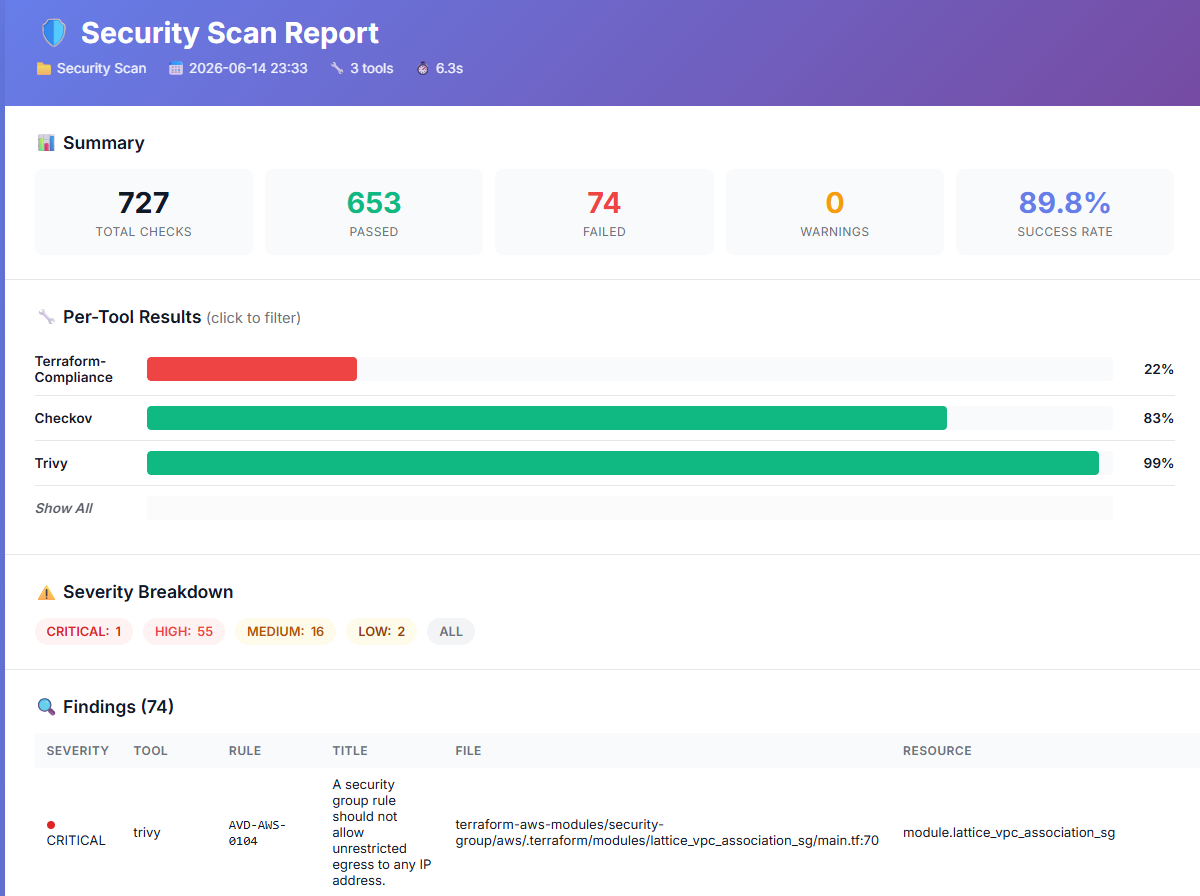
After running a Trivy scan, ThothCTL generates a unified HTML report with severity breakdown, findings, and trend analysis:
KICS
KICS (Keeping Infrastructure as Code Secure) is an open source solution for static code analysis of IaC. Requires Docker.
# Scan with KICS (requires Docker)
thothctl scan iac -t kics
Terraform-compliance
Terraform-compliance (v1.15.1) is a lightweight BDD test framework that evaluates tfplan.json files against Gherkin .feature files. It enables human-readable compliance scenarios like “S3 buckets must have encryption enabled.”
Prerequisites
pip install terraform-compliance
Requires tfplan.json files in your project (generated with terraform show -json tfplan.binary > tfplan.json).
Usage
# Local features directory
thothctl scan iac -t terraform-compliance -o "features_dir=features"

# Git repository with subpath (//subpath syntax)
thothctl scan iac -t terraform-compliance -o "features_dir=https://github.com/myorg/org-policies.git//compliance/features"

# Git repository (auto-discovers compliance/features/ or features/)
thothctl scan iac -t terraform-compliance -o "features_dir=https://github.com/myorg/org-policies.git"

# SSH Git URL with subpath
thothctl scan iac -t terraform-compliance -o "features_dir=git@github.com:myorg/compliance.git//features"

# Auto-discover from THOTH_ORG_POLICY (looks in compliance/features/)
export THOTH_ORG_POLICY=https://github.com/myorg/org-policies.git
thothctl scan iac -t terraform-compliance
Features Resolution
| Priority | Source | Example |
|---|---|---|
| 1 | Git URL with //subpath |
https://github.com/myorg/policies.git//compliance/features |
| 2 | Git URL (auto-discovers compliance/features/ or features/) |
https://github.com/myorg/policies.git |
| 3 | Relative to project | features/ |
| 4 | Absolute path | /shared/compliance/features |
| 5 | THOTH_ORG_POLICY env → compliance/features/ |
Auto-discovered |
Writing Feature Files
Feature files use Gherkin syntax:
Feature: Ensure encryption is enabled for all storage resources

  Scenario: S3 buckets must have encryption
    Given I have aws_s3_bucket defined
    Then it must have server_side_encryption_configuration

  Scenario: RDS instances must be encrypted
    Given I have aws_db_instance defined
    Then it must have storage_encrypted
    And its value must be true
Feature: Ensure all resources have required tags

  Scenario Outline: Resources must have mandatory tags
    Given I have resource that supports tags defined
    Then it must have tags
    And it must contain <tag>

    Examples:
      | tag         |
      | Environment |
      | Owner       |
      | Project     |
Per-Stack Scanning
ThothCTL finds all tfplan.json files in your project and runs terraform-compliance against each one individually. Results are aggregated into:
- Per-stack HTML reports at
Reports/terraform-compliance/html_reports/ - Unified
scan_report.htmlalongside other tools
Organization Policy Integration
Store feature files in your org policy repo alongside OPA policies:
org-policies/
├── compliance/features/     ← terraform-compliance features
│   ├── encryption.feature
│   ├── tagging.feature
│   └── networking.feature
├── shared/policy/           ← OPA/Rego policies
└── rules/                   ← ThothCTL structure rules
Both tools share the same THOTH_ORG_POLICY env var.
OPA / Conftest
Open Policy Agent (OPA) is a CNCF-graduated general-purpose policy engine. ThothCTL integrates OPA through two modes:
- Conftest mode (default): Static analysis of
.tf,.yaml,.json, and.hclfiles using Conftest, which evaluates Rego policies directly against configuration files without requiring a Terraform plan. - OPA mode: Plan-based evaluation using
opa execagainsttfplan.jsonfiles, enabling policies that inspect planned changes (blast radius, IAM modifications, resource deletions, etc.).
Both modes use the same Rego policy language.
Prerequisites
Install one or both tools depending on your use case:
# Install Conftest (for static HCL analysis)
thothctl init env  # select conftest

# Install OPA (for plan-based evaluation)
thothctl init env  # select opa

# Or install manually
brew install conftest  # macOS
brew install opa       # macOS
Writing Policies
Create a policy/ directory in your project root with .rego files:
mkdir -p policy
Example policy — deny S3 buckets without encryption (policy/s3.rego):
package main

deny contains msg if {
    some resource in input.resource.aws_s3_bucket
    not resource.server_side_encryption_configuration
    msg := sprintf("S3 bucket '%s' must have encryption enabled", [resource])
}
Example policy — deny public security groups (policy/security_groups.rego):
package main

deny contains msg if {
    some name, sg in input.resource.aws_security_group
    some rule in sg.ingress
    rule.cidr_blocks[_] == "0.0.0.0/0"
    msg := sprintf("Security group '%s' allows ingress from 0.0.0.0/0", [name])
}

warn contains msg if {
    some name, sg in input.resource.aws_security_group
    not sg.tags
    msg := sprintf("Security group '%s' has no tags", [name])
}
!!! note
Conftest looks for deny, warn, and violation rules in the main namespace by default. deny and violation rules count as failures. warn rules count as warnings.
Conftest Mode (Static Analysis)
Scans .tf files directly — no Terraform plan required:
# Basic scan with default policy/ directory
thothctl scan iac -t opa

# Custom policy directory
thothctl scan iac -t opa -o "policy_dir=my-policies"

# Specific Rego namespace
thothctl scan iac -t opa -o "namespace=terraform.security"

# With additional data files
thothctl scan iac -t opa -o "data_dir=data"
OPA Mode (Plan-Based Evaluation)
Evaluates policies against tfplan.json files for deeper analysis of planned changes:
# First generate a plan
terraform plan -out=tfplan.binary
terraform show -json tfplan.binary > tfplan.json

# Evaluate with OPA
thothctl scan iac -t opa -o "mode=opa"

# Custom decision path
thothctl scan iac -t opa -o "mode=opa,decision=terraform/analysis/authz"
Example blast radius policy (policy/terraform.rego):
package terraform.analysis

import input as tfplan

blast_radius := 30

weights := {
    "aws_autoscaling_group": {"delete": 100, "create": 10, "modify": 1},
    "aws_instance": {"delete": 10, "create": 1, "modify": 1},
}

default authz := false

authz if {
    score < blast_radius
    not touches_iam
}

score := s if {
    all := [x |
        some rt, crud in weights
        x := crud.delete * num_deletes[rt] + crud.create * num_creates[rt] + crud.modify * num_modifies[rt]
    ]
    s := sum(all)
}

touches_iam if {
    some rc in tfplan.resource_changes
    rc.type == "aws_iam"
}
Cost Governance Policies
OPA/Conftest can enforce cost governance rules — budget gates, instance type restrictions, required cost tags, and more. See Cost Governance Policies with OPA for complete examples including:
- Deny expensive instance types and enforce cost allocation tags (Conftest mode)
- Budget gate that blocks deployments exceeding a monthly threshold (OPA mode)
- Prevent mass resource deletion and enforce Reserved Instance coverage (OPA mode)
# Static cost policies against .tf files
thothctl scan iac -t opa -o "policy_dir=policy" --enforcement hard

# Plan-based budget gate against tfplan.json
thothctl scan iac -t opa -o "mode=opa,decision=terraform/cost/allow" --enforcement hard
Policy Source Resolution
The policy_dir option supports multiple sources. ThothCTL resolves policies in this order:
| Priority | Source | Example |
|---|---|---|
| 1 | Git repository URL | https://github.com/myorg/opa-policies.git |
| 2 | Relative to project | policy → <project>/policy/ |
| 3 | Absolute path | /shared/company-policies |
| 4 | THOTH_POLICY_REPO env var |
Pre-cloned org repo |
Git Repository as Policy Source
Pass a Git URL directly as policy_dir to fetch policies from a remote repository:
# Use policies from a Git repo
thothctl scan iac -t opa -o "policy_dir=https://github.com/myorg/opa-policies.git"

# Pin to a specific branch or tag
thothctl scan iac -t opa -o "policy_dir=https://github.com/myorg/opa-policies.git@v1.2.0"
thothctl scan iac -t opa -o "policy_dir=https://github.com/myorg/opa-policies.git@main"

# SSH URL
thothctl scan iac -t opa -o "policy_dir=git@github.com:myorg/opa-policies.git@v1.0"
Repos are cached locally at ~/.thothcf/.policy_cache/ and updated on subsequent runs. This enables:
- Centralized policy management — one repo shared across all projects
- Versioned policies — pin to a tag for stability, or track
mainfor latest - CI/CD friendly — no need to pre-clone; ThothCTL handles it
Organization Policy Repo (env var)
For teams that pre-clone a shared policy repository in CI/CD:
export THOTH_POLICY_REPO=/path/to/cloned/org-policies

# ThothCTL will look for policies at:
# 1. <THOTH_POLICY_REPO>/<policy_dir>
# 2. <THOTH_POLICY_REPO>/shared/policy (fallback)
thothctl scan iac -t opa -o "policy_dir=networking"
Conftest vs OPA Mode
| Aspect | Conftest mode | OPA mode |
|---|---|---|
| Input | .tf, .yaml, .json, .hcl files |
tfplan.json files |
| Requires plan | No | Yes |
| Best for | Static policy checks (encryption, tags, naming) | Change analysis (blast radius, IAM, deletions) |
| Tool required | conftest |
opa |
Enforcement Mode
The --enforcement flag controls whether policy violations cause the scan command to exit with a non-zero exit code. This applies to all scanning tools, not just OPA.
| Mode | Violations found | Exit code |
|---|---|---|
soft (default) |
yes | 0 |
soft |
no | 0 |
hard |
yes (any tool) | 1 |
hard |
no | 0 |
# Soft mode (default) — report only
thothctl scan iac -t checkov -t opa

# Hard mode — fail pipeline if any tool finds violations
thothctl scan iac -t checkov -t opa --enforcement hard

# Hard mode in CI/CD — will fail the build step
thothctl scan iac -t checkov -t trivy -t opa --enforcement hard --post-to-pr
!!! tip
Use --enforcement hard in CI/CD pipelines to gate deployments on security compliance. Use --enforcement soft (default) during local development for informational scanning.
Report Output
Every scan produces multiple output formats:
Always Generated
| Output | File | Description |
|---|---|---|
| Terminal table | — | Rich table with per-tool pass/fail/warnings/errors/success rate |
| Severity breakdown | — | Terminal table showing CRITICAL/HIGH/MEDIUM/LOW counts |
| Trend comparison | — | Delta vs previous scan (stored in local SQLite at ~/.thothcf/scan_history.db) |
| Unified HTML report | Reports/scan_report.html |
Single-page professional report with summary, per-tool bars, severity badges, findings table, and trend |
| Markdown summary | Reports/scan_summary.md |
Machine-readable summary with severity section |
Conditional Outputs
| Output | Flag | File | Description |
|---|---|---|---|
| JSON report | --output json |
Reports/scan_report.json |
Structured data for CI/CD pipelines |
| SARIF report | --output sarif |
Reports/scan_results.sarif |
GitHub Code Scanning / IDE integration |
| PR comment | --post-to-pr |
— | Posts summary to PR (GitHub/Azure DevOps) |
Output Formats
JSON (--output json)
Structured JSON for CI/CD machine consumption:
thothctl scan iac -t checkov -t trivy --output json
{
  "timestamp": "2026-06-14T15:30:00",
  "directory": "/path/to/project",
  "total_findings": 5,
  "severity_counts": {"CRITICAL": 1, "HIGH": 2, "MEDIUM": 2},
  "tools": [
    {
      "tool": "checkov",
      "status": "COMPLETE",
      "passed": 40,
      "failed": 3,
      "findings": [{"id": "CKV_AWS_19", "severity": "CRITICAL", "title": "...", "file": "main.tf", "line": 12}]
    }
  ]
}
SARIF (--output sarif)
SARIF 2.1.0 format for integration with:
- GitHub Code Scanning / Advanced Security
- Azure DevOps
- VS Code SARIF Viewer extension
- JetBrains IDE plugins
# Generate SARIF report
thothctl scan iac -t checkov --output sarif

# Upload to GitHub Code Scanning
gh api repos/:owner/:repo/code-scanning/sarifs -f "sarif=@Reports/scan_results.sarif"
Unified HTML Report
A single self-contained scan_report.html with:
- Summary cards (total/passed/failed/rate)
- Per-tool success rate bars
- Severity badge breakdown
- Sortable findings table with file/resource/rule details
- Trend comparison (if previous scan exists)
- Print-optimized styling
Generated automatically on every scan — no flag needed.
Trend / Historical Comparison
ThothCTL automatically stores scan results in a local SQLite database (~/.thothcf/scan_history.db) and shows improvement/regression vs the previous scan for the same directory:
📈 Trend (vs 2026-06-13)
┌──────────┬──────────┬─────────┬─────────┐
│ Metric   │ Previous │ Current │ Delta   │
├──────────┼──────────┼─────────┼─────────┤
│ Findings │ 8        │ 5       │ ↓ -3    │
│ Passed   │ 38       │ 44      │ ↑ +6    │
│ Failed   │ 8        │ 5       │ ↓ -3    │
│ CRITICAL │ 2        │ 1       │ ↓ -1    │
│ HIGH     │ 4        │ 3       │ ↓ -1    │
└──────────┴──────────┴─────────┴─────────┘
- No configuration needed — history is always saved automatically
- Per-directory tracking — each project gets its own history
- Shown in HTML report — trend is included in
scan_report.html
CI/CD: Comparing Across Runs
For CI/CD pipelines (where local SQLite isn’t persistent), use artifact-based comparison:
# GitHub Actions — compare vs previous scan
- uses: actions/download-artifact@v4
  with:
    name: scan-baseline
  continue-on-error: true

- run: thothctl scan iac -t checkov -t trivy --output json --enforcement hard

- uses: actions/upload-artifact@v4
  with:
    name: scan-baseline
    path: Reports/scan_report.json
Report Directory Structure
Reports/
├── scan_report.html              ← Unified multi-tool report (summary, severity, findings, trend)
├── scan_summary.md               ← Markdown summary
├── scan_report.json              ← JSON (--output json)
├── scan_results.sarif            ← SARIF (--output sarif)
├── checkov/
│   └── security-scan/
│       ├── html_reports/
│       │   ├── index.html        ← Per-stack browser with links to individual reports
│       │   ├── report_network_vpc.html
│       │   ├── report_data_rds.html
│       │   └── ...
│       ├── report_network_vpc/
│       │   ├── results_junitxml.xml   ← Raw JUnit XML
│       │   └── results_json.json      ← Raw Checkov JSON
│       ├── report_data_rds/
│       │   └── ...
│       └── checkov_log_report.txt
├── trivy/                        ← Raw Trivy output
│   └── results.json
└── opa/                          ← Raw OPA/Conftest output
    ├── conftest_results.json
    └── results_junitxml.xml
Browsing reports:
- Open
Reports/scan_report.htmlfor the unified summary with severity and trend - Open
Reports/checkov/security-scan/html_reports/index.htmlto browse individual stack results with detailed check-level findings
Examples
Basic Scan
# Run a basic scan with default settings (Checkov)
thothctl scan iac
Multi-Tool Scan
# Comprehensive scan with multiple tools
thothctl scan iac -t checkov -t trivy -t opa
CI/CD with Hard Enforcement and SARIF
# Fail pipeline on violations + produce SARIF for GitHub Security tab
thothctl scan iac -t checkov -t opa --enforcement hard --output sarif --post-to-pr
Custom Report Directory
# Specify a custom directory for reports
thothctl scan iac --reports-dir ./security-reports
Using OpenTofu Instead of Terraform
# Use OpenTofu instead of Terraform
thothctl scan iac --tftool tofu
Integration with CI/CD
GitHub Actions
name: Security Scan

on:
  pull_request:
    branches: [ main ]

jobs:
  security-scan:
    runs-on: ubuntu-latest
    steps:
      - uses: actions/checkout@v4

      - name: Install ThothCTL
        run: pip install thothctl

      - name: Install scanning tools
        run: |
          # Checkov (included with thothctl)
          # Install Conftest for OPA policies
          LATEST=$(curl -s https://api.github.com/repos/open-policy-agent/conftest/releases/latest | grep tag_name | cut -d '"' -f 4 | sed 's/v//')
          curl -L -o /tmp/conftest.tar.gz https://github.com/open-policy-agent/conftest/releases/download/v${LATEST}/conftest_${LATEST}_Linux_x86_64.tar.gz
          tar xzf /tmp/conftest.tar.gz -C /usr/local/bin conftest

      - name: Run Security Scan
        run: thothctl scan iac -t checkov -t opa --enforcement hard --post-to-pr --reports-dir ./reports
        env:
          GITHUB_TOKEN: $

      - name: Upload Scan Results
        if: always()
        uses: actions/upload-artifact@v4
        with:
          name: security-scan-results
          path: ./reports
Azure Pipelines
- script: |
    pip install thothctl
    thothctl scan iac -t checkov -t opa --enforcement hard --post-to-pr
  displayName: 'Security Scan'
  env:
    AZDO_PERSONAL_ACCESS_TOKEN: $(System.AccessToken)
Best Practices
- Use
--enforcement hardin CI/CD — Gate deployments on security compliance to prevent insecure infrastructure from reaching production. - Use multiple scanning tools — Different tools catch different types of issues. Combine Checkov (built-in rules) with OPA (custom policies) for best coverage.
- Use
--output sariffor GitHub — Upload SARIF to GitHub Code Scanning for findings directly in PR diffs and the Security tab. - Write custom OPA policies — Encode your organization’s specific security requirements as Rego policies. Use Git repos as policy source for centralized management.
- Track trends — Scan history is automatic. Review the trend table to catch regressions early.
- Use Conftest mode for fast feedback — Static HCL analysis doesn’t require a Terraform plan, making it ideal for pre-commit hooks and early CI stages.
- Use OPA mode for change analysis — Plan-based evaluation catches issues that static analysis can’t, like blast radius and IAM changes.
- Use
--output jsonin CI/CD — Machine-readable output for custom integrations, dashboards, and artifact-based comparison across runs.